What are Sysinternal Tools
Sysinternals are a list of internal tools developed in the late 1990s, and hosted on Microsoft’s website, to help manage, troubleshoot and diagnose Windows and Linux systems and applications.
According to the ZoomIt website, “ZoomIt is a screen zoom, annotation, and recording tool for technical presentations and demos. You can also use ZoomIt to snip screenshots to the clipboard or to a file. ZoomIt runs unobtrusively in the tray and activates with customizable hotkeys to zoom in on an area of the screen, move around while zoomed, and draw on the zoomed image.”
Download and Install ZoomIt
- Download ZoomIt from the link above, the file will be a 1 MB zip file
- Navigate to the startup folder within your computer, you can access it either via:
Clicking [Ctrl + R] and typing “shell:startup” into the search bar
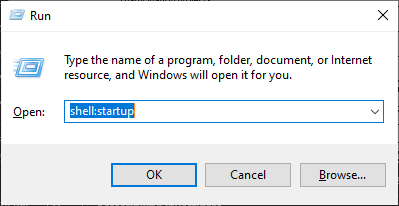
Navigating to - C:\Users*USERNAME\AppData\Roaming\Microsoft\Windows\Start Menu\Programs\Startup*
- Grab the file called “ZoomIt64.exe” from the downloaded Zip folder and place it within that folder
Screen Annotation

To start performing annotations, Press the keyboard shortcut [ CTRL + 2 ] to enter annotation mode. Here you will have a marker where you can point at items with the pointer.
ZoomIt supports many different colors, and the pointer color can change based on the corresponding key press.
P -> Pink Pen R -> Red Pen G -> Green Pen B -> Blue Pen Y -> Yellow Pen O -> Orange Pen
To create arrows, [ Ctrl + Shift + Mouse Click ] to create an arrow pointer at the location where the screen was clicked.

To create boxes, [ Ctrl + Mouse Drag ] to select a certain portion of the screen to annotate.

Screen Zoom
To perform a screen zoom, press the shortcut [Ctrl + 1] and move the mouse around to change the focus of the zoom on the screen.

Stopwatch Timer
 To start a timer, press the shortcut [Ctrl + 3] and a timer at the default time of 10 minutes. You can then use the scroll wheel to increase the timer duration as needed.
Other Useful Shortcuts
In conclusion, ZoomIt from Microsoft offers a set of powerful utilities to help users quickly annotate their screens with ease. This tool is particularly useful for presentations, online meetings, or any scenario where clear communication is key. Beyond simple annotations, ZoomIt allows for zooming and drawing on the screen in real-time, making it easier to highlight points of interest or explain complex ideas visually.